Wednesday, 19 March 2008

Butterfly Apeture Card 3

Machine Used: Baby Cricut
Cartridge(s) used: George and Basic Shapes
Picture(s):

Download cut file: Butterfly Apeture Card 3
Link to Message Board topic: Butterfly Apeture Card 3

Easter Card and Gift

Machine Used: Baby Cricut
Cartridge(s) used: George and Basic Shapes
Description: The cut file contains all the pieces to both decorate the bucket and make the card except for the daffodils as these are a Sizzix paper sculpting die. The bunny rabbit’s tail has been made with cotton wool.
Picture(s):


Download cut file: Easter Card and Gift
Link to Message Board topic: Easter Card and Gift

Thursday, 13 March 2008

Butterfly Aperture Card 2

Machine Used: Baby Cricut
Cartridge(s) used: George and Basic Shapes
Picture(s):

Download cut file: Butterfly Aperture Card 2
Link to Message Board topic: Butterfly Aperture Card

Wednesday, 12 March 2008

Handbag Card

Machine Used: Baby Cricut
Cartridge(s) used: George and Basic Shapes
Description: This cut file has 5 mats. it works in a similar way to that of the bodice as it has two pattern mats. these are dot and star. If you would like to use one these first load your paper into machine cut the chosen pattern then click LOAD PAPER and select the mat called handbag and click cut. On the card picture bellow I did not use a pattern as I had some rather nice textured paper.
Picture(s):

Download cut file: Handbag Card
Link to Message Board topic: Handbag Card

Wednesday, 5 March 2008

Winging their way to you

Machine Used: Expression
Cartridge(s) used: George and Basic shapes and Mickey Font
Description: This file a C5 size card or A4 folded in half so envelopes are easy to get. There are 3 mats to the cut file. First choose the card you want for the outside and place on cutting mat and load into machine. Then cut out the mat labeled Card Cut Out, then press LOAD PAPER and cut out Card outline. Next choose the colour for insert place on to cutting mat and load into machine and cut out the mat labeled insert then again press LOAD PAPER and cut out Card outline.
Picture(s):

Download cut file: Winging their way to you
Link to Message Board topic: Winging their way to you

Monday, 3 March 2008

Butterfly Aperture Card

Machine Used: Baby Cricut
Cartridge(s) used: George and Basic Shapes
Description: This card is done in pearlescent papers. The stamped background behind the aperture is done in pearlescent ink and is a docraft stamp. Also this card is a C6 so you can get envelopes easily.
Picture(s):

Download cut file: Butterfly Aperture Card
Link to Message Board topic: Butterfly Aperture Card

Bodice Cards

Machine Used: Baby Cricut
Cartridge(s) used: George and Basic Shapes
Description: First cut out the main card blank. Then load paper of your choice and choose the design you would like on the bodice (spot, stitch, heart or star) cut this out then press LOAD PAPER again and cut out the bodice itself.
Picture(s):
Spot design:
Stitch Design:
Heart Design:


Star Design

Download cut file: Bodice Card
Link to Message Board topic: Bodice Card

Thursday, 28 February 2008

Pot of Flowers for Mothers Day

Machine Used: Baby Cricut
Cartridge(s) used: George and Basic Shapes
Description: This is my first go at one of these. The pot was from a homeware store in the UK called au natural interiors. I then stuck my decoration on the pot with foam pads. For the flowers I bought some garden canes so that I didn't have to paint them and stuck the flowers to them.
Picture(s):

Download cut file: Pot of Flowers for Mothers Day
Link to Message Board topic: Pot of Flowers for Mothers Day

Wednesday, 27 February 2008

Happy Birthday Butterfly Card all in George

Machine Used: Baby Cricut
Cartridge(s) used: George and Basic Shapes
Description: This cut file contains 4 mats. These are the Card Blank itself, the Butterfly to be placed over the relevant section on the card blank, the words to place over the shadow version on the card blank and finally the main butterfly body.
Picture(s):


This card was made by MichelleWinegardner using this cut file. It is fabulous.


Download cut file: Happy Birthday Butterfly Card all in George
Link to Message Board topic: Happy Birthday Butterfly Card all in George

Happy Birthday Butterfly Card

Machine Used: Baby Cricut
Cartridge(s) used: George and Basic Shapes and Mickey Font
Description: I created this card with my crafty friend Gill the gorges paper we used was her idea and it I think this made the card look fantastic. This cut file contains 4 mats. These are the Card Blank itself, the Butterfly to be placed over the relevant section on the card blank, the words to place over the shadow version on the card blank and finally the main butterfly body.
Picture(s):

Download cut file: Happy Birthday Butterfly Card
Link to Message Board topic: Happy Birthday Butterfly Card

Sunday, 24 February 2008

Butterfly Mothers Day Card

Cartridge(s) used: George and Basic Shapes
Description: This cut file contains 4 mats. These are the Card Blank itself, the Butterfly to be placed over the relevant section on the card blank, the words to place over the shadow version on the card blank and finally the main butterfly body.
Picture(s):
Download cut file: Butterfly Mothers Day Card
Link to Cricut Message Board Topic: Butterfly Mothers Day Card

Saturday, 23 February 2008

Dress Up Teddy Bear Happy Birthday Card

Cartridge(s) used: George and Basic Shapes. Outfit is from Paper doll Dress Ups.
Description:This card can be used with all the paper dolls outfits at 4 inch so you can dress it how you want!
Picture(s):
Download cut file: Dress Up Teddy Bear Happy Birthday Card
Link to Cricut Message Board Topic: Dress Up Teddy Bear Happy Birthday Card

Tuesday, 19 February 2008

File Server Changed

I no longer upload my files using media fire as I and others feel that the pop ups and adverts are inappropriate so thanks to amkscrap I now have my files directly linked off my page so no more adverts! To see amkscrap's wonderful creations please visit her blog at: http://amkscrap.blogspot.com/

Monday, 18 February 2008

BECKY Word Book & Gift Box

Cartridge(s) used: George and Basic Shapes. Gift box with Paper Doll Dress Ups and George.
Description:If you would like instructions on how to make a word book visit Susan Bluerobots page here is a link to her help lesson http://susanbluerobot.blogspot.com/2008/01/cricu-design-studio-name-book.html. These instruction are really helpful and without them I would not have attemped doing a word book so Thank you very much Susan!
Picture(s):
Here is a picture of all the pages before I put them together:

Here is a picture of all the pages once they were conected in a book format.

Here is a picture of the gift box which i filled with crafty goodies for my friend.


Download cut file: BECKY Word Book
Link to Cricut Message Board Topic: BECKY Word Book & Gift Box

Thursday, 14 February 2008

Man Card

Cartridge(s) used: George and Basic Shapes
Description: The stamps are both from Do Crafts in the UK.
Picture(s):

Download cut file: Man Card
Link to Cricut Message Board Topic: Man Card

Valentine Cards

Cartridge(s) used: George and Basic Shapes
Description: The stamps used are a Woodware clear stamp set.
Picture(s):

Download cut file: To my Valentine
Link to Cricut Message Board Topic: To my Valentine
Cartridge(s) used: George and Basic Shapes
Description: The stamps used are a Woodware clear stamp set.
Picture(s):
Download cut file: Be Mine Card
Link to Cricut Message Board Topic: Be Mine Card

Spider Man

Cartridge(s) used: George and Basic Shapes, Paper doll Dress Ups and Doodlecharms.
Description: This card was created using design studio from a suggestion from my crafty friend Gill.
Picture(s):
These are the pieces before assembly:
Download cut file: Spider Man
Link to Cricut Message Board Topic: Spider Man

Spider Web cards

Cartridge(s) used: George and Basic Shapes, Paper Doll Dress Ups and Doodlecharms
Picture(s):

Download cut file: Spider Web Card

Cartridge(s) used: Paper Doll Dress Ups and George and Basic Shapes
Picture(s):
Download cut file: Spider Web Card with Spider

Sunday, 3 February 2008

Tutorial to create Stencil for Brads

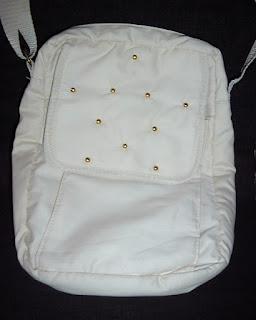
I decorated this bag with help from Cricut Design Studio by creating a template here is a picture of my finished project which I used a JML Gem Styler on. To download the cut file for the template click here.
If you would like to leave feedback but do not have a blogger account please click here to go to the topic on the cricut message board.
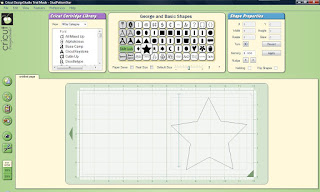
This is my first tutorial so I hope you find it easy to use. This template could be used for doing brads or eyelets. First to create your template, choose the size and shape you want mine is the star from George.

Then set the size to 1 inch and chose a circle.
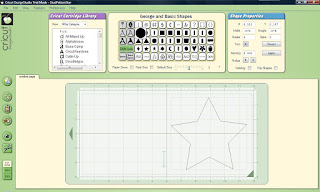
Then make it smaller to a size you feel happy with and move into place so that it plus sign that marks the centre is lined up with the point of the star.


Continue with this till all the points are marked with circles.


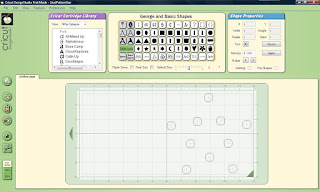
Now you need to get rid of the star. So click on it and delete it. You should now be let with something that is similar to the image bellow.
It is now ready to cut out. Here is an image of my stencil, which I cut out of plastic on the multi cut feature.

Then place the template over your project and use it as a guide of where to put your brads.

Oriental 3 Fold Screen Card

Cartridge(s) used: George and Basic Shapes
Picture(s):

Download cut file: Oriental 3 Fold Screen Card
Link to Cricut Message Board Topic: Oriental 3 Fold Screen Card